

Windows desktop · HL7 v2.1 – v2.8.1
The spec says what an interface should send.
HealthFlow7 reads the traffic and tells you what it actually sends. Fourteen modules for the engineers who build, migrate and troubleshoot HL7 interfaces — all running locally on your machine.
14 days, every feature. Three modules stay free forever — no expiry, no card.
The core idea
Most HL7 problems are not problems with one message.
They are problems with a feed. HealthFlow7 profiles the whole thing — which fields are really populated, which codes really appear, what changed since last month, and which of yesterday’s messages doesn’t look like the others.
What the written spec says
PID-8 is optional. PV1-3 may contain a point-of-care code. ORC repeats.
Written once, often years ago, by someone who no longer works there.
What the traffic shows
PID-8 populated in 99.4% of 212,880 messages. PV1-3 carries 6 codes, 98% coverage. ORC never repeats.
Measured from the feed itself, this week, on your machine.
Four situations it was built for
Integration engineers, interface analysts and healthcare IT consultants — usually on a deadline.
Interface migration
Moving a feed from one EHR, engine or vendor to another and needing to prove the new side sends the same thing as the old side.
Production troubleshooting
A message failed at 3 a.m. and someone has to work out why this one differs from the thousands that worked.
Onboarding a new partner
A trading partner sends traffic but the written specification is thin, outdated or missing entirely.
Test data preparation
Real traffic is needed in a test system or with a vendor, and the patient data has to come out first.
Feature inventory
Fourteen modules, grouped by the job they do
Read and understand a message
The everyday toolsHL7 Viewer & Editor
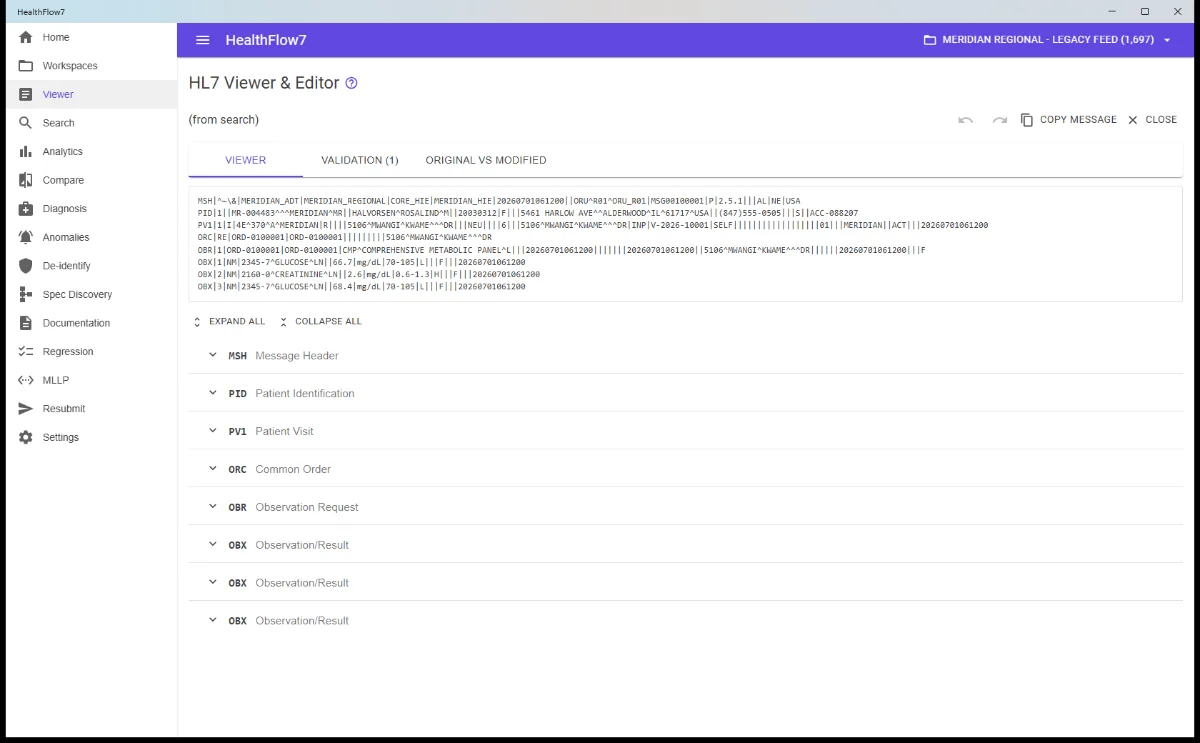
FREEShows one message as raw text and as a segment-by-segment breakdown, with every field named from the HL7 dictionary.
- Every field labelled with its dictionary name, data type and required/optional status
- Edit any field in place, with an original-vs-modified view of exactly what changed
- Live validation tab counting structural and datatype problems
Advanced Search
FREEFinds messages by plain value anywhere in the message, or by a precise field-path expression.
- Query language with = != > < ~ (contains), plus AND / OR / NOT and parentheses
- Dates and numbers compare as dates and numbers, not strings
- Partial-value matching: MSH-9 = ADT^A01 finds ADT^A01^ADT_A01
- Saved searches for queries you reuse, and every match highlighted in the full text
Workspaces & import
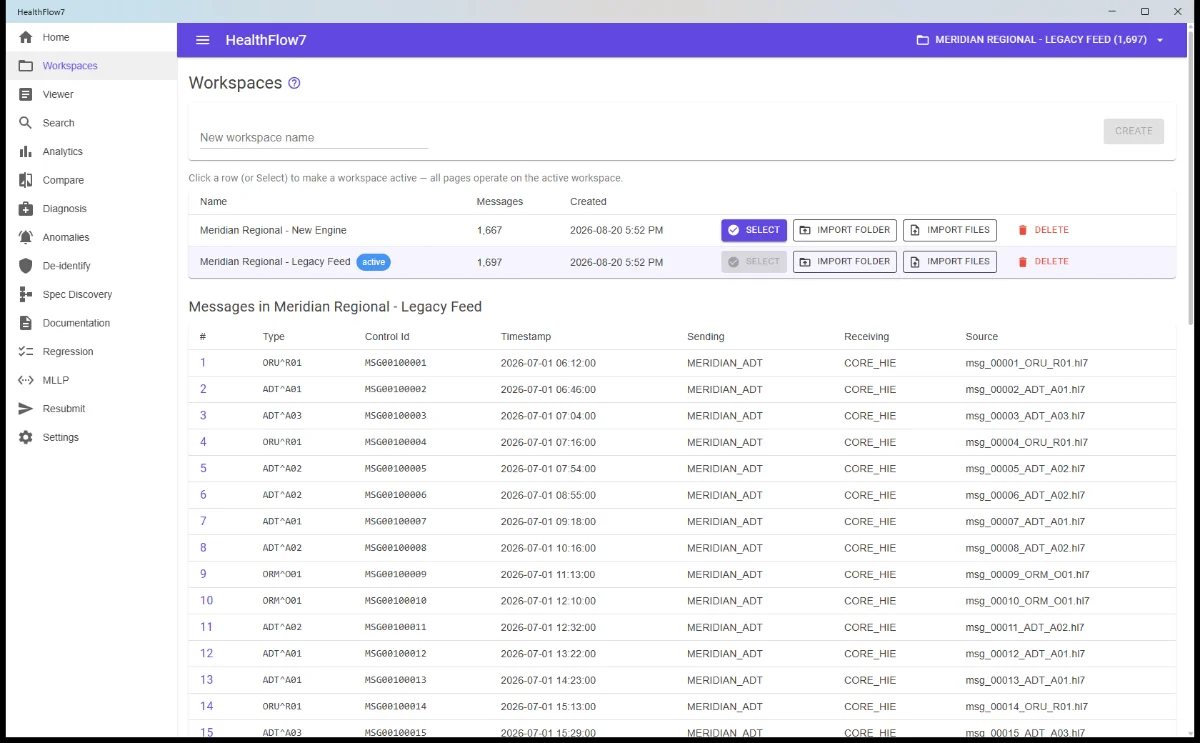
FREEA workspace is a named collection of messages — typically one interface or one capture window. Everything else operates on it.
- Import whole folders including sub-folders, or individual files
- Reads .hl7, .txt, .dat and .msg
- Replays in true arrival order using file timestamps
- Re-importing appends rather than replaces, so a feed can be topped up
Understand a whole interface
The differentiators — turn traffic into knowledgeAnalytics
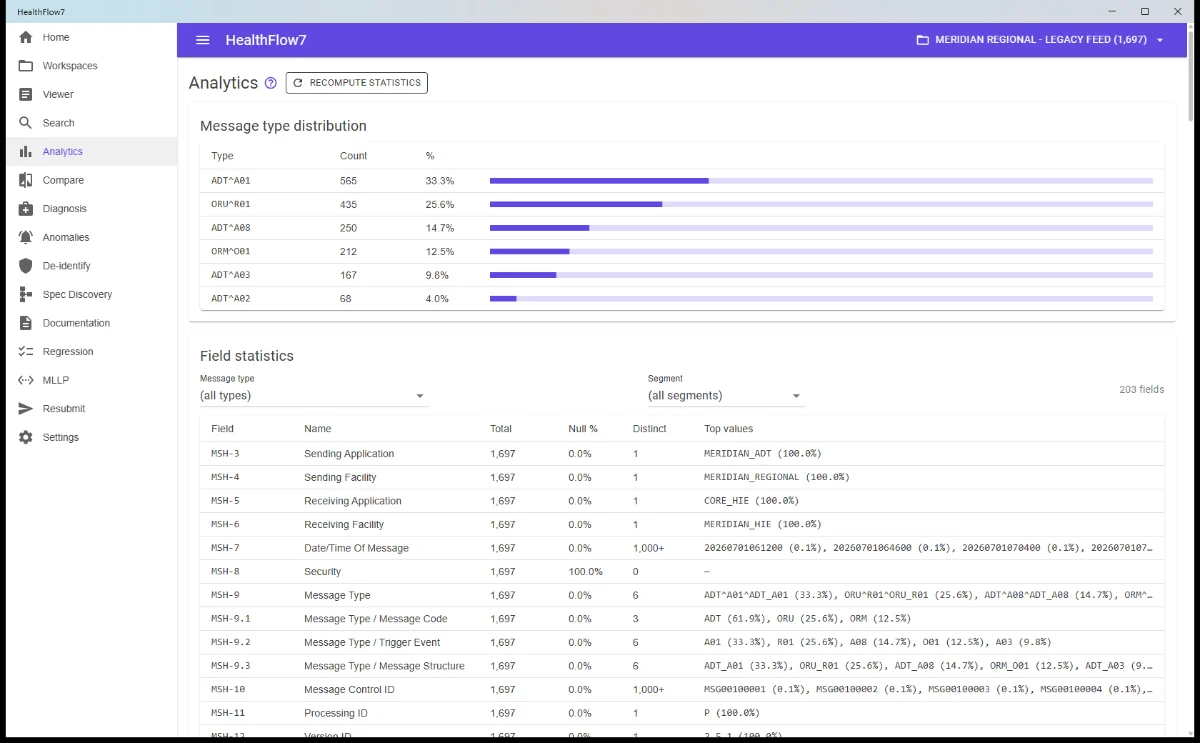
PAIDProfiles an entire workspace: which message types arrived, and for every single field, how often it is populated and what values it carries.
- Message type distribution across the feed
- Per field: total occurrences, null percentage, distinct value count
- Full value breakdown with shares — a short list with high coverage means you’ve found a code set
- Filter by message type and by segment
Specification Discovery
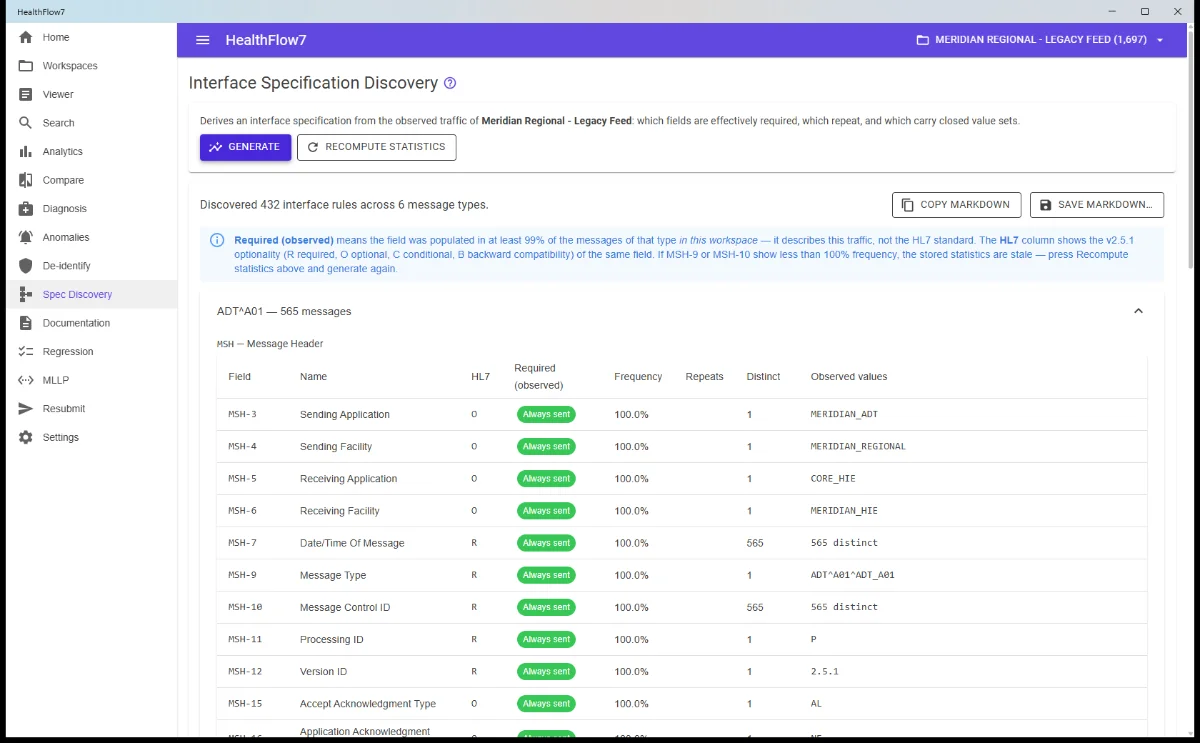
PAIDReverse-engineers an interface specification from traffic already captured — the answer when the partner’s documentation doesn’t exist.
- Which segments and fields the sender actually uses, grouped by message type
- Flags fields populated in 99%+ of messages as effectively required by this feed
- Shows the standard’s own required/optional status side by side, so the gap is visible
- Identifies repeating fields and closed code sets; exports to Markdown
Interface Documentation
PAIDGenerates a written interface document for a feed: what it sends, how it varies, where it is likely to cause problems, plus a full HL7 reference for every segment it uses.
- Exports to Word (.docx), PDF and Markdown
- Word output has real headings and tables, ready to brand and send to a partner
- Sections for overview, discovered spec, segment reference, and known variations
- AI-written executive summary when an AI provider is configured
Migrate and verify
Prove the new system matches the old oneCompare Workspaces
PAIDPairs up the messages of two workspaces and reports every field that differs — the core check when migrating an interface.
- Pair by message control id (MSH-10) or by position, so renumbering doesn’t matter
- Unpaired counts surface dropped or extra traffic immediately
- Differences graded Critical / Warning / Info by clinical significance
- Filter by difference kind; rows banded so one message pair reads as one group
Regression Testing
PAIDA suite of saved messages, each with an expectation about it. Re-run after any interface change to prove nothing broke.
- Expectations use the same expression syntax as Search
- Capture the message that actually broke in production — the regression you never want back
- Whole suite re-runs in one click with a pass count
- Nothing is transmitted, so suites are safe to run at any time
Troubleshoot and replay
When something is broken right nowMessage Diagnosis
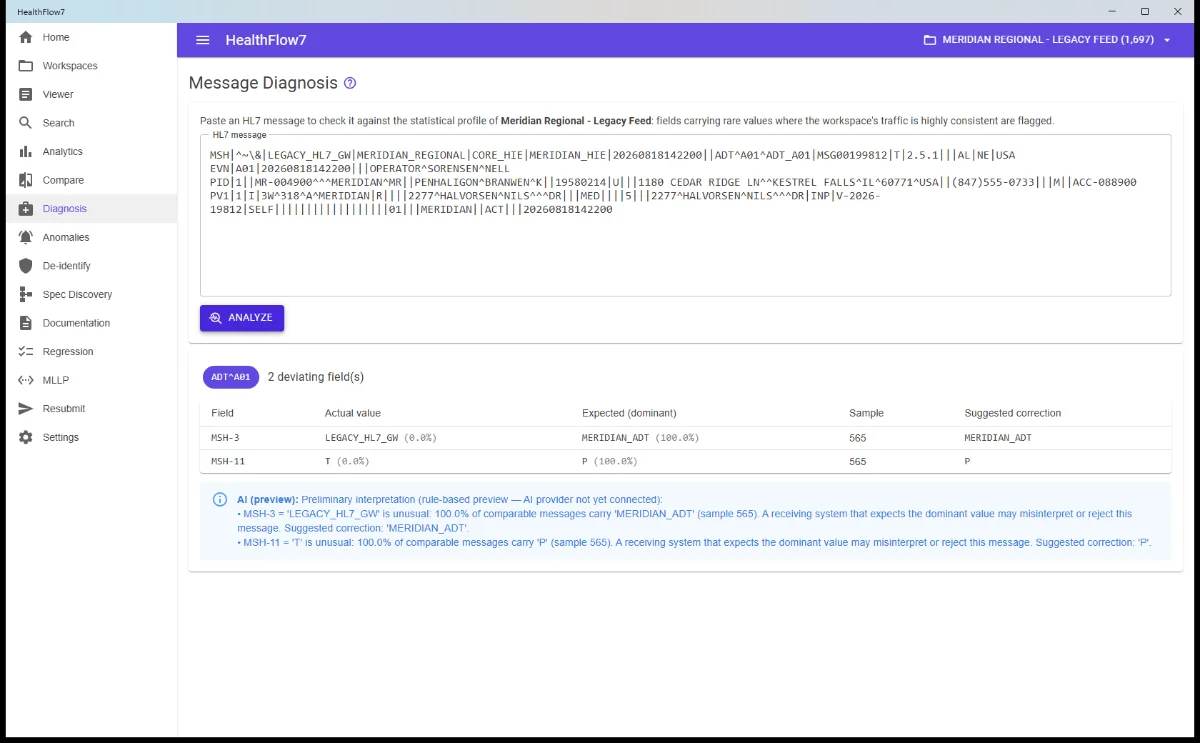
PAIDChecks one suspect message against the statistical profile of a healthy workspace and flags the fields carrying an unusual value — the quick answer to “why did this one fail?”
- Names the field, the value this message carries, and the value the feed almost always uses
- Deliberately strict thresholds keep names, timestamps and control ids out of the results
- Requires no configuration — the baseline is traffic you already imported
MLLP Listener & Sender
PAIDRuns a listener that accepts messages and answers them, and a sender that transmits a message and shows the ACK.
- Auto-generated ACKs across all six HL7 codes — AA / AE / AR and CA / CE / CR
- Fixed-response mode for reproducing malformed or unusual ACKs
- TLS support on both sides; round-trip timing on every send
- Received messages listed live, with a full connection log of both halves
Message Resubmission
PAIDReplays messages from a folder or a database query to an MLLP endpoint in strict FIFO order — message N+1 is never sent until N is acknowledged or conclusively failed.
- Source from a folder of files or a SQL query against SQL Server or SQLite
- Preview the exact send order before anything is transmitted
- Three NACK policies: stop, skip, or retry with exponential backoff
- Post-run summary with duration, throughput and a row per message that didn’t ACK
Protect data, and scale
Free, and optional by designPHI De-identification
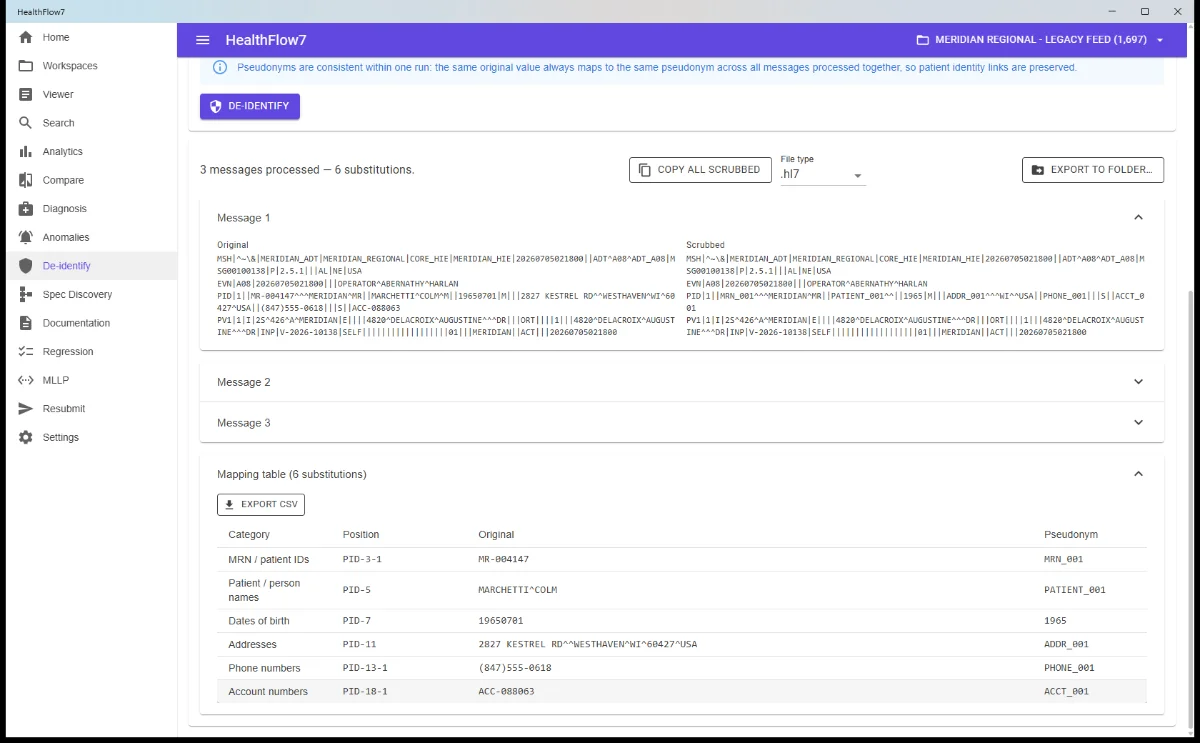
PAIDReplaces protected health information with consistent pseudonyms, so messages can be shared with vendors or loaded into test systems.
- The same original value always becomes the same pseudonym, so a patient across 500 messages stays one patient
- Category control: names, MRNs and account numbers, addresses, phone numbers, dates of birth
- Structure, assigning authorities, id types and codes survive intact, so messages still parse and route
- Mapping table of every substitution, exportable to CSV
AI assistance
OPTIONALNarrative features — documentation summaries, diagnosis explanations, comparison assessments — backed by an AI provider you choose and supply.
- Works with OpenAI, Azure OpenAI, Anthropic, or a local model via Ollama
- You can host your own local LLM, such as Ollama, on your machine so data never leaves it
- De-identify-before-sending is on by default, so PHI is scrubbed before any text reaches a provider
- Entirely optional — every feature works without it
Storage & scale
FREELocal SQLite by default, with SQL Server for shared or very large workspaces.
- SQLite needs nothing installed — a single local file
- SQL Server for teams and high volumes; schema created automatically
- Switch provider from Settings without reinstalling
- High-throughput bulk import path for large captures
Runs locally
Patient data stays on the machine
Messages are imported into a local database and never leave the machine unless you explicitly configure an AI provider or send traffic to an endpoint you name. The only outbound connections are licence checks.
Free forever, or everything
The free tier has no expiry. The trial exists to unlock the analysis features, not to gate basic use. Paid licences come two ways: one named user on one machine, or one shared machine with as many users as you like. A paid licence is an annual subscription. While it is running you receive every update and new feature we release. If you choose not to renew, you keep the newest version published during your term and can carry on using it — nothing expires and nothing is disabled; renewing resumes updates from that point. Support is available while your subscription is active. The free and trial tiers carry no support commitment, and support stops when a term lapses until it is renewed.
Free
$0 no expiry
Three modules, unlimited use: Viewer & Editor, Advanced Search and Workspaces & import.
Download freePaid licence
$199 CAD per user, per device *
The licensed modules: MLLP Listener & Sender, PHI De-identification, Analytics, Specification Discovery, Interface Documentation, Compare Workspaces, Regression Testing, Message Resubmission and Message Diagnosis. One named user on one machine.
Buy nowOr start the 14-day trial first — all features, no card.
Shared device
$999 CAD per shared device *
The same licensed modules on a machine more than one person signs in to — a shared virtual machine, a terminal server or a jump box. Covers every user on that one device, with no per-user count to track.
Buy nowFor Citrix, RDS and shared clinical workstations.
* Licences are sold annually. An active subscription is what entitles you to updates, new features and support. To keep receiving them beyond the first year, renew at the annual price. If you do not renew, you keep the newest version published during your term and can carry on using it, but updates and support stop until you renew.
| Feature | Free | Trial | Paid |
|---|---|---|---|
| HL7 Viewer & Editor | Yes | Yes | Yes |
| Advanced Search | Yes | Yes | Yes |
| Workspaces & import | Yes | Yes | Yes |
| MLLP Listener & Sender | — | Yes | Yes |
| PHI De-identification | — | Yes | Yes |
| Analytics | — | Yes | Yes |
| Compare Workspaces | — | Yes | Yes |
| Specification Discovery | — | Yes | Yes |
| Interface Documentation | — | Yes | Yes |
| Regression Testing | — | Yes | Yes |
| Message Resubmission | — | Yes | Yes |
| Message Diagnosis | — | Yes | Yes |
The 14-day trial
Unlocks everything, once per machine. When it ends the app returns to the free tier — nothing is lost, the paid modules simply lock again.
When your subscription ends
You keep the version you have and carry on using it, perpetually. Renewing resumes updates and new features from that point.
Moving machines
An activation code ties the licence to one device, and you can release it from that device yourself.
Technical specifications
- HL7 versions
- HL7 v2.1 through v2.8.1. Within that range messages are parsed from their own delimiters and structure, so nothing is rejected because of the version in MSH-12. HL7 v2.9 is not supported.
- Field dictionary
- Embedded HL7 v2.5.1 dictionary supplies field names, data types, code tables and validation. Segments and fields added after v2.5.1 still parse, search, compare and export — they simply appear by position without a name.
- Custom Z-segments
- Accepted everywhere, at any version, never flagged as errors.
- Operating system
- Windows 10 (build 19041 / version 2004) or later, and Windows 11. 64-bit.
- Prerequisites
- The Microsoft Edge WebView2 runtime, which current Windows and Windows Server builds already include. No runtime or framework to install.
- Installation
- Standard Windows MSI installer with an optional desktop shortcut.
- Data storage
- SQLite by default (a single local file, nothing to install) or Microsoft SQL Server for shared and very large workspaces.
- Network protocol
- MLLP over TCP, with optional TLS on both listener and sender.
- Import formats
- .hl7, .txt, .dat, .msg — individually or by folder, including sub-folders.
- Export formats
- Word (.docx), PDF, Markdown (.md), CSV, and raw HL7 files.
- Connectivity
- Works fully offline. The only outbound connections are licence checks.
Questions prospects actually ask
Does it read FHIR or HL7 v3?
Not today — HL7 v3 and FHIR are different standards and are not read by the current release. Support is coming soon; stay tuned. HealthFlow7 covers HL7 v2.1 through v2.8.1.
What happens to our custom Z-segments?
They are accepted everywhere, at any version, and never flagged as errors.
Will a message be rejected because of its version?
Not within the supported range. Messages are parsed from their own delimiters and structure, so a v2.1 through v2.8.1 message is never rejected for the version in MSH-12. The embedded v2.5.1 dictionary supplies names, data types and code tables; fields added after v2.5.1 still parse, search, compare and export — they simply appear by position without a name. HL7 v2.9 is outside the supported range and may not parse.
What do we need to install first?
A standard Windows MSI, with an optional desktop shortcut. There is no runtime or framework to install — the only component the application relies on is the Microsoft Edge WebView2 runtime, which is already present on current Windows and Windows Server builds. See the dependencies question below.
What are the dependencies?
HealthFlow7 renders its interface with the Microsoft Edge WebView2 runtime, so that runtime has to be present. It ships as part of current versions of Windows and Windows Server and is kept up to date by Windows Update, so on an up-to-date machine there is nothing for you to do. On an older or stripped-down build it may be missing, and Microsoft distributes it free: download the WebView2 runtime. The Evergreen Standalone Installer and the offline deployment package on that page both work for machines without internet access. Nothing else is required.
Does patient data leave our network?
Not unless you configure it to. Everything runs locally, and the only connection we receive is the licence check. Two features do transmit, to destinations you name: Message Resubmission and the MLLP Sender send real message content — patient data included — to the endpoint you point them at. Send only to systems you trust and have authority to write to, and confirm the target before resubmitting into a live interface. If you enable AI assistance, de-identify-before-sending is on by default, and you can point it at your own sovereign or edge AI deployment so message content never leaves your environment.
Find out what your feed actually sends
Fourteen days, every module, on your own traffic.